React Native architectures: layered, clean, and feature-first in real projects
React Native architecture is a strategic decision, not a folder-style preference.
The right choice depends on business structure, team topology, delivery workflow, and how much team independence you need.
Small or mid-size apps often start with layered folders, and that can work well, even for high-impact products. But when scale, parallel work, and department ownership grow, architecture must provide stronger boundaries, clearer isolation, and safer change paths.
Clean Architecture can help with those boundaries, but it also adds structure and ceremony that many mobile teams do not need everywhere.
Feature-first usually feels more natural in React Native because it maps directly to screens, hooks, store, and delivery slices that product teams request.
Why this topic matters #
Architecture is not just folder organization.
It defines whether business teams and development teams can move together without friction:
- How workflow moves from requirement to implementation.
- How requirements are shipped safely inside the structure.
- How much isolation each team has.
- How much independence each team has to build without blocking others.
If architecture does not match business departments and ownership, execution gets slow even when developers are technically strong.
The simplest structure most teams start with #
Before clean or feature-first, many React Native projects in production start with a root-level scaffold like this:
components/
  Button.tsx
hooks/
  useAuth.ts
screens/
  HomeScreen.tsx
services/
  apiClient.ts
store/
  appStore.ts
utils/
  formatDate.ts
types/
  api.ts
This is common for a reason:
- Easy to understand on day one.
- Fast for small teams and early delivery.
- Low ceremony and low tooling overhead.
But growth pain usually appears:
- Feature ownership is unclear.
- Business requirements spread across shared folders.
- Isolation decreases as cross-folder coupling grows.
So this scaffold is a valid starting point, but usually not a strong long-term architecture when multiple teams or departments need parallel delivery.
Clean architecture in context: where it comes from #
Clean Architecture became widely known through Robert C. Martin’s work (2012), building on earlier patterns such as Hexagonal Architecture and Onion Architecture.
The core idea is simple:
- Keep business rules in the center.
- Keep frameworks and external tools on the outside.
- Enforce inward dependencies only.
In practice, this means UI, API clients, storage, and platform details are adapters. The use cases and core policies should not depend on React Native, navigation libraries, or networking libraries.
In React Native, this model is useful when:
- The business rules are complex and long-lived.
- Multiple teams touch the same critical flows.
- You need strong control over change impact.
But it also has a cost: more layers, more files, and more coordination per feature.
A super simple clean architecture cycle (end-to-end) #
This is intentionally small, just to show that even a tiny use case involves multiple layers.
src/
  orders/
    domain/
      Order.ts
    application/
      ports/OrderRepository.ts
      ConfirmOrderUseCase.ts
    infrastructure/
      HttpOrderRepository.ts
    presentation/
      useConfirmOrder.ts
      ConfirmOrderScreen.tsx
// domain/Order.ts
export class Order {
constructor(
public readonly id: string,
public readonly totalCents: number,
public readonly status: 'draft' | 'confirmed',
) {}
confirm(): Order {
if (this.totalCents <= 0) throw new Error('Invalid total');
return new Order(this.id, this.totalCents, 'confirmed');
}
}// application/ports/OrderRepository.ts
import { Order } from '../../domain/Order';
export interface OrderRepository {
getById(id: string): Promise<Order>;
save(order: Order): Promise<void>;
}// application/ConfirmOrderUseCase.ts
import { OrderRepository } from './ports/OrderRepository';
export class ConfirmOrderUseCase {
constructor(private readonly repository: OrderRepository) {}
async execute(orderId: string): Promise<void> {
const order = await this.repository.getById(orderId);
await this.repository.save(order.confirm());
}
}// infrastructure/HttpOrderRepository.ts
import { OrderRepository } from '../application/ports/OrderRepository';
import { Order } from '../domain/Order';
export class HttpOrderRepository implements OrderRepository {
async getById(id: string): Promise<Order> {
const dto = await fetch(`/api/orders/${id}`).then((r) => r.json());
return new Order(dto.id, dto.totalCents, dto.status);
}
async save(order: Order): Promise<void> {
await fetch(`/api/orders/${order.id}`, {
method: 'PUT',
body: JSON.stringify(order),
});
}
}// presentation/useConfirmOrder.ts
import { ConfirmOrderUseCase } from '../application/ConfirmOrderUseCase';
export const createConfirmOrder = (useCase: ConfirmOrderUseCase) => {
return async (orderId: string) => useCase.execute(orderId);
};That is the point: for one “confirm order” action, you already have several pieces to maintain.
In the right business context, this is great. In many React Native projects, it is heavy.
Clean architecture vs feature-first: the real difference is scope and granularity #
These models are not the same size.
- Clean architecture usually models wider business boundaries.
- Feature-first usually models a narrower delivery slice.
A single business area can contain 10-20 features over time. As that scope grows, clean architecture tends to require stricter layering, stricter language, and stronger team alignment on patterns.
Feature-first works at a finer granularity. Each feature can be isolated, shipped, and evolved with less cross-cutting cognitive load.
So yes, both approaches can have layers, but they operate at different scales.
Why clean architecture is often not the best default in React Native #
Clean architecture is a good fit only when business complexity truly requires that investment.
Why it can be expensive in mobile:
- More abstractions to read and maintain.
- Many RN teams are newer and feature-delivery oriented.
- Product pressure usually asks for vertical shipping speed.
- Over-modeling can slow the team before value is shipped.
- As domains expand, every change may require deeper navigation across shared layers and stricter conventions.
We move faster today, with AI, better tooling, and tighter release loops. In that context, full clean architecture for every feature can feel like too much for small or mid-size product needs.
Why feature-first architecture is usually a better default #
Feature-first organizes by business-facing user slices and keeps delivery aligned to what departments request, with more practical granularity.
Example:
features/
  checkout/
    ui/
      CheckoutScreen.tsx
      CheckoutSummary.tsx
    hooks/
      useCheckout.ts
    application/
      submitOrder.ts
    data/
      checkoutApi.ts
      checkoutRepository.ts
    model/
      Checkout.ts
    state/
      checkoutStore.ts
    tests/
      submitOrder.test.ts
  onboarding/
    ui/
      OnboardingScreen.tsx
    hooks/
      useOnboarding.ts
    application/
      completeOnboarding.ts
    data/
      onboardingApi.ts
    model/
      OnboardingStep.ts
This is still architecture, not chaos.
It gives:
- Clear ownership by feature.
- Faster onboarding.
- Better mapping between business requirement and code location.
- Better isolation and independence for parallel team execution.
- Lower coordination cost when many requests are moving at once.
Monolith vs monorepo when teams scale #
Both are valid. Choose based on organization reality and ownership boundaries.
Monolith (single app repository) #
Best when:
- Team is small to medium.
- There is one main mobile product.
- You need low process overhead and fast iteration.
Why choose it:
- Simpler tooling.
- Faster local development.
- Fewer cross-package coordination costs.
Monorepo (apps + packages) #
Best when:
- Team is bigger.
- Multiple business departments ship to different app surfaces.
- You need shared but controlled capabilities across apps.
Why choose it:
- Explicit ownership per package.
- Better reuse with clear boundaries.
- Better organizational scalability.
Cost:
- More CI/CD complexity.
- Need strict dependency governance.
- Requires stronger engineering standards.
How to choose based on team and business departments #
Small team, single product, low org complexity #
Start with layered architecture or feature-first monolith.
Use layered when:
- The project is not split by business departments.
- There are no independent squads per business area yet.
- You need a simple shared structure with low ceremony.
Use feature-first monolith when:
- You already work from feature tickets and vertical slices.
- You want clearer feature ownership from day one.
- You expect rapid feature growth in the near term.
- Keep boundaries simple.
- Optimize for delivery speed.
- Add complexity only where pain appears.
Bigger organization, multiple departments or apps #
Use feature-first monorepo.
- Map packages to domain/business ownership.
- Define contracts between teams.
- Protect isolation so each department can ship independently.
If clean architecture is needed, apply it selectively inside critical features or core packages instead of forcing it across the whole app.
The architecture should mirror how decisions are made in the business.
Practical recommendations #
- Start feature-first by default in React Native.
- Use layered architecture when the team is small and ownership is shared.
- Add clean architecture selectively for high-risk/high-complexity business cores.
- Use clean boundaries, even in feature-first (ui, application, data, model).
- Enforce dependency rules in lint and CI.
- Avoid giant
shared/folders without ownership. - Keep requirements traceable from ticket to feature folder.
Popular production projects: what they actually do #
One important reality check: many popular React Native projects in production do not follow one pure architecture style.
Most of the examples shared are layered/horizontal structures at the root level, sometimes with feature signals mixed in.
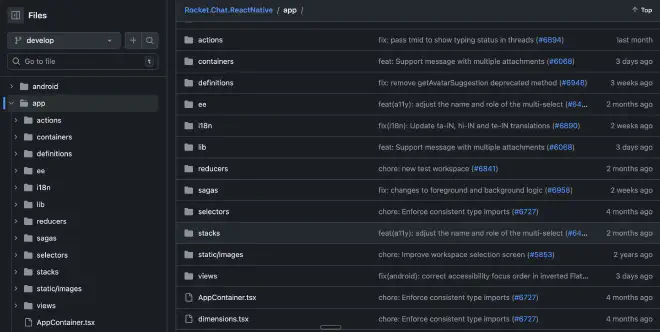
1. Rocket.Chat.ReactNative (~150 contributors) #
- Style: layered root-level architecture.
- Folder signals:
actions,containers,reducers,sagas,selectors,views,stacks. - Takeaway: very common in mature Redux-era apps, with strong separation by technical layer.
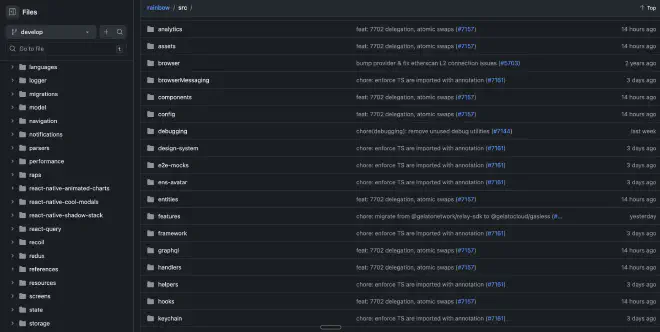
2. Rainbow Wallet (~78 contributors) #
- Style: layered + mixed (includes
featuresandentities). - Folder signals:
components,hooks,navigation,screens,state, plusfeatures,entities,framework. - Takeaway: a hybrid evolution pattern where teams keep layered roots while adding feature/domain-oriented spaces.
3. Expensify/App (~750 contributors) #
- Style: layered root-level architecture.
- Folder signals:
components,hooks,pages,libs,selectors,styles,types,utils. - Takeaway: even at very large contributor scale, a layered structure can work if conventions and ownership are clear.

4. MetaMask Mobile (~280 contributors) #
- Style: layered + hybrid.
- Folder signals:
actions,component-library,components,constants,contexts,core,hooks, andfeatures/SampleFeature. - Takeaway: strong layered base, gradually opening feature-first spaces.

What this shows in practice:
- Architecture choice is rarely binary.
- Layered structure is still dominant in many production React Native apps.
- Hybridization is common as products and organizations grow.
- The best architecture is the one that matches ownership, workflow, and delivery pressure, not the one with the cleanest diagram.
Links #
- React Native architecture docs: https://reactnative.dev/architecture/landing-page
- Expo monorepo guide: https://docs.expo.dev/guides/monorepos/
- Nx React Native monorepo docs: https://nx.dev/technologies/react/react-native/introduction
Conclusions #
My opinionated default for React Native is:
- Feature-first as the base structure for most product teams.
- Monolith for smaller teams, monorepo for larger multi-department setups.
- Clean architecture where business domains are wide, stable, and complex enough to justify stricter patterns.
In short: choose the architecture that lets business and engineering move at the same speed.